Is There a Fishin' Frenzy App You Can Download?
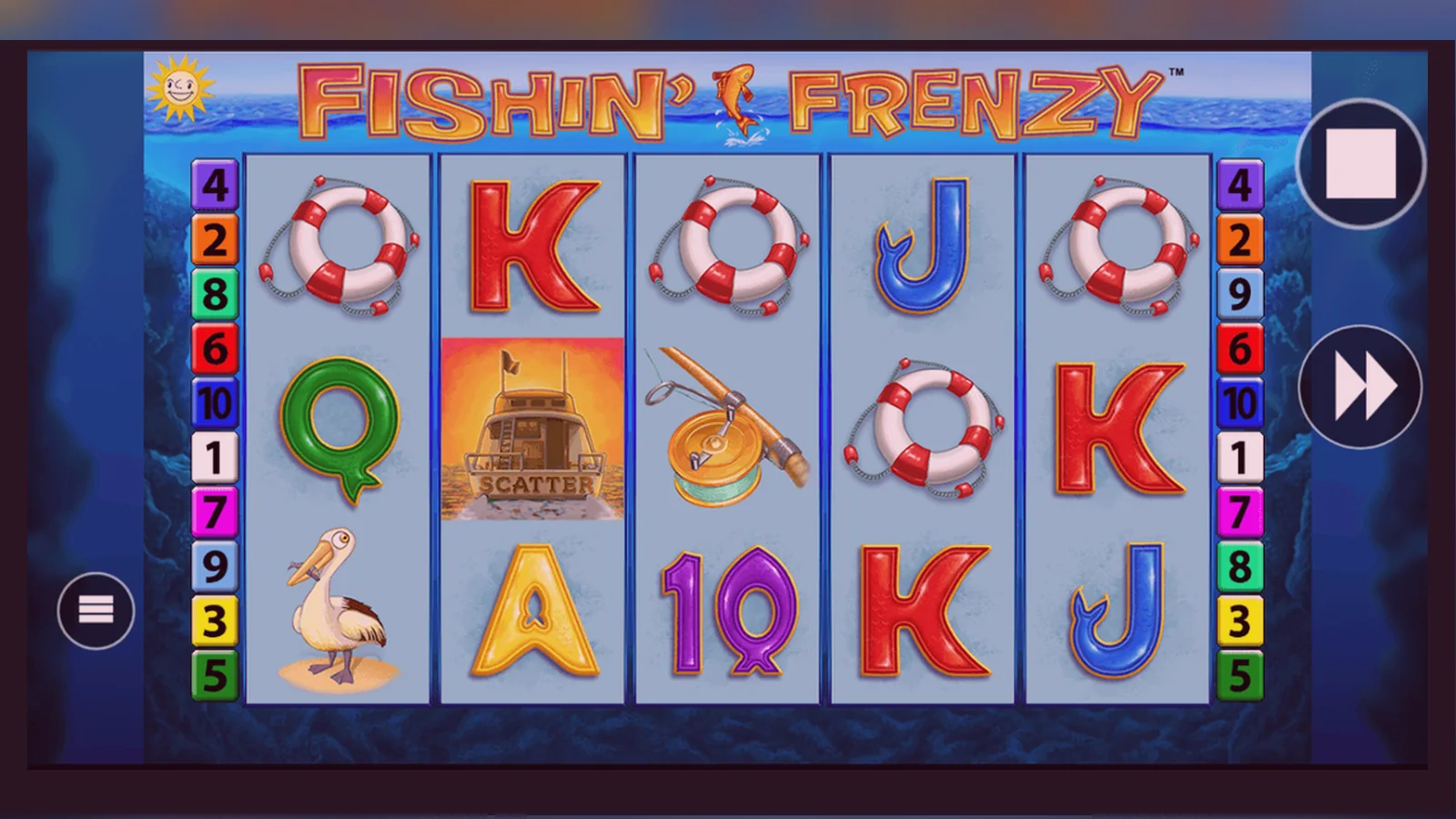
Fishin' Frenzy runs at 96.12% RTP with a maximum win of £50,000 – but the most common support question isn't about payouts, it's about whether there's a standalone app to download. Short answer: most UKGC-licensed operators don't publish a dedicated Fishin' Frenzy app in the App Store or Google Play. Instead, you play it through the casino's own app or directly in your mobile browser.
This page walks you through every install path – browser play, add-to-home-screen shortcuts, operator apps, and the APK route – then explains how to spot fake clones, which permissions are a red flag, and what your phone actually needs to run the game smoothly.
The Store Card No One Publishes (But Here's What It Would Look Like)
If Fishin' Frenzy were a standalone app, its Play Store or App Store listing would carry these details. In practice, the game sits inside operator apps – Ladbrokes, Coral, Gala Bingo – or runs as a web app in your browser. Still, knowing the specs helps you judge whether a third-party APK is genuine or a rip-off.
Three Screens You'll Actually See When You Play
Fishin' Frenzy's mobile interface is the same whether you launch it from Safari, Chrome, or an operator app. Here's what you navigate:
- Lobby screen – game thumbnail, RTP badge, a «Play Now» button, and a demo toggle if you're logged in and age-verified. On some UKGC sites, demo play only appears after you complete KYC checks.
- Stake picker and spin controls – a slider or tap-to-adjust stake selector at the bottom, spin button on the right, autoplay and paytable icons on the left. The stake caps at £5.00 per spin, or £2.00 if you're 18–24 and the operator has adopted the voluntary limit early.
- Free-spins overlay – when you land three or more scatter symbols, the screen dims, shows how many spins you've won, and drops you straight into the bonus round. The fisherman collects prizes on every spin until the feature ends.
No separate «download progress» or install wizard – the game loads in under three seconds on 4G, and the full 28 MB asset bundle caches locally after the first session.
Four Ways to Install (and the Risk of Each)
Support tickets split evenly between «I can't find the app» and «Is this APK safe?» Here's every path, step by step, with the catch spelled out.
| Method | Steps | Risk | |
|---|---|---|---|
| Browser play | 1. Open the operator's site in Safari or Chrome. 2. Log in or register (age and identity checks happen here). 3. Search «Fishin' Frenzy» in the lobby. 4. Tap Play. | Zero install risk; you play the HTML5 version. Requires a stable connection – a dropped 4G signal mid-spin reloads the round from the server state, so no wager is lost. | → |
| Add to home screen | 1. Load the game in your mobile browser. 2. Tap the share icon (iOS) or three-dot menu (Android). 3. Select «Add to Home Screen». 4. Name the shortcut. 5. Tap to launch; it opens in a standalone window without browser chrome. | The shortcut is just a bookmark – it doesn't install anything. You still need an internet connection, and the operator's site must stay accessible in the UK. | → |
| Operator app (Ladbrokes, Coral, etc.) | 1. Download the operator's app from the App Store or Google Play. 2. Register and verify your age (photo ID, proof of address). 3. Log in. 4. Navigate to Slots, search «Fishin' Frenzy», tap Play. | The app is UKGC-licensed and sandboxed by Apple or Google. KYC takes 24–48 hours; until then, deposits are blocked. Once verified, the game runs inside the operator's wrapper – same RTP, same max win. | → |
| APK from a third-party site | 1. Enable «Install unknown apps» in Android settings. 2. Download the APK from a non-official source. 3. Tap the file to install. 4. Grant permissions. 5. Launch. | High risk. APKs outside Google Play aren't scanned for malware, and many «casino app» APKs harvest SMS codes for two-factor bypass or inject ad libraries that siphon data. If the APK asks for SMS, contacts, or camera access before you even open the game, delete it. | → |
What Your Phone Actually Needs
Fishin' Frenzy is an HTML5 slot, so the hardware bar is low. Most phones sold in the UK since 2020 handle it without stutter.
- Operating system: iOS 13 or later, Android 8.0 (Oreo) or later. Older versions may load the game but drop frames during the free-spins animation.
- RAM: 2 GB minimum; 3 GB recommended if you switch between apps mid-session. The game caches 28 MB of assets, and low-RAM devices (1 GB) sometimes force-close the browser tab when memory pressure spikes.
- Storage: 50 MB free for the cached bundle and session logs. Operator apps need an additional 80–120 MB.
- Connection: 4G or Wi-Fi. The game pulls server updates on every spin, so a 3G connection works but introduces 1–2 second delays. If you drop signal mid-spin, the wager is logged server-side and the round resumes when you reconnect.
- Screen size: 4.7 inches minimum (iPhone SE form factor). Smaller screens clip the stake controls, and you'll need to zoom out manually.
What the App (or Web Build) Actually Does
Whether you launch Fishin' Frenzy from an operator app or a browser tab, the underlying tech is identical: an HTML5 canvas talking to Blueprint's game server via WebSocket. Here's what happens under the hood:
- Stakes and balance – you set your stake (£0.10 to £5.00, or £2.00 if you're 18–24 on a capped operator), tap spin, and the client sends a bet request to the server. The server deducts the stake, runs the RNG calculation, returns the reel outcome and any win, then updates your balance. All of this happens server-side; the app just animates what the server already decided.
- Free spins – when you trigger the bonus, the server awards a set number of spins and tracks the fisherman's prize multiplier. Each spin inside the feature is a separate RNG call, but your stake stays locked at the level that triggered the round.
- Session persistence – if your connection drops, the game logs your last action and balance. When you reload, the server resumes from the exact spin state. You never lose a wager to a crash, though the animation might replay from the start of the interrupted round.
- KYC and limits – before you can deposit, the operator checks your age and identity against credit-reference data (Experian, TransUnion). Affordability checks kick in at £150 net deposits a month. If the check flags you, the operator may freeze further deposits until you provide bank statements or payslips. This happens in the operator's system, not the game itself, but it gates your access to real-money play.
How to Spot a Fake Clone and Which Permissions Scream «Delete This»
Fake casino apps flood Android sideload sites, and some even slip past Play Store moderation for a few days before Google pulls them. Here's how to tell a clone from the real thing:
- Developer name – Blueprint Gaming don't publish player-facing apps. If the Play Store listing says «Fishin' Frenzy by Ocean Gaming Studio» or any name other than a known UKGC operator (Ladbrokes, Gala, Coral, etc.), it's a clone.
- Permission requests – a legitimate slot inside an operator app asks for location (to confirm you're in the UK), camera (for ID upload during KYC), and notifications (for bonus alerts). It does not need SMS, contacts, phone logs, or device admin rights. If an APK requests those before you even see the lobby, uninstall immediately.
- UKGC register check – open the operator's site in a browser, scroll to the footer, and note the licence number. Then search that number in the UKGC public register. If it's not there, the operator is unlicensed and marketing to UK players illegally. Any app from an unlicensed operator is a clone by definition.
- In-app purchase prices – real-money casino apps show deposit amounts in GBP (£10.00, £25.00, £50.00) and cap single transactions at operator-defined limits. If the app lists prices in USD or lets you «buy coins» for $99.99, it's either a social-casino wrapper (play-money only) or a scam app that takes your card details and runs.
- Domain in the app – when you tap a link inside the app (terms, responsible gaming, help), it should open the operator's .co.uk or .com domain. If it redirects to a .ru, .online, or random ccTLD, close the app and report it to Google.
FAQ
Do I need to download an app to play Fishin' Frenzy on my phone?
No. Fishin' Frenzy runs in any mobile browser – Safari, Chrome, Firefox – and loads in under three seconds on 4G. You can also download the operator's app (Ladbrokes, Coral, Gala) from the App Store or Google Play; the game sits inside that app's lobby. There's no standalone Fishin' Frenzy app published by Blueprint.
Is it safe to download a Fishin' Frenzy APK from a third-party site?
No. APKs from non-official sources aren't scanned by Google, and many «casino APK» files contain malware that steals SMS codes or injects ad trackers. UKGC-licensed operators publish apps only through the App Store and Google Play. If a site offers a direct APK download, assume it's a phishing attempt and avoid it.
Why does the operator app ask for my photo ID before I can play for real money?
Every UKGC-licensed operator must verify your age and identity before you deposit. That means uploading a photo of your driving licence or passport, plus a recent utility bill or bank statement for proof of address. The check usually takes 24–48 hours. Once approved, you can deposit via debit card, PayPal, Apple Pay, or Open Banking. Credit cards have been banned for gambling in the UK since 2020.
What happens if my phone loses signal mid-spin?
The wager is logged server-side the moment you tap spin, so a dropped connection doesn't void the bet. When you reconnect – either by reloading the browser or reopening the app – the server resumes the round from its last state. You'll see the reels land on the outcome the RNG already decided, and your balance updates accordingly. No stake is lost to a crash.